

If you would like a detailed explanation of this project, please refer to the Medium article below.
The project is also available for testing on Hugging Face.
Audio-Classification-Raw-Audio-to-Mel-Spectrogram-CNNs
Complete end-to-end audio classification pipeline using deep learning. From raw recordings to Mel spectrogram CNNs, includes preprocessing, augmentation, dataset validation, model training, and evaluation - a reproducible blueprint for speech, environmental, or general sound classification tasks.
Audio Classification Pipeline - From Raw Audio to Mel-Spectrogram CNNs
“In machine learning, the model is rarely the problem - the data almost always is.”
- A reminder I kept repeating to myself while building this project.
This repository contains a complete, professional, end-to-end pipeline for audio classification using deep learning, starting from raw, messy audio recordings and ending with a fully trained CNN model using Mel spectrograms.
The workflow includes:
- Raw audio loading
- Cleaning & normalization
- Silence trimming
- Noise reduction
- Chunking
- Data augmentation
- Mel spectrogram generation
- Dataset validation
- CNN training
- Evaluation & metrics
It is a fully reproducible blueprint for real-world audio classification tasks.
Project Structure
Here is a quick table summarizing the core stages of the pipeline:
| Stage | Description | Output |
|---|---|---|
| 1. Raw Audio | Unprocessed WAV/MP3 files | Audio dataset |
| 2. Preprocessing | Trimming, cleaning, resampling | Cleaned signals |
| 3. Augmentation | Pitch shift, time stretch, noise | Expanded dataset |
| 4. Mel Spectrograms | Converts audio → images | PNG/IMG files |
| 5. CNN Training | Deep model learns spectrogram patterns | .h5 model |
| 6. Evaluation | Accuracy, F1, Confusion Matrix | Metrics + plots |
1. Loading & Inspecting Raw Audio
The dataset is loaded from directory structure:
paths = [(path.parts[-2], path.name, str(path))
         for path in Path(extract_to).rglob('*.*')
         if path.suffix.lower() in audio_extensions]

df = pd.DataFrame(paths, columns=['class', 'filename', 'full_path'])
df = df.sort_values('class').reset_index(drop=True)
During EDA, I computed:
- Duration
- Sample rate
- Peak amplitude
And visualized duration distribution:
plt.hist(df['duration'], bins=30, edgecolor='black')
plt.xlabel("Duration (seconds)")
plt.ylabel("Number of recordings")
plt.title("Audio Duration Distribution")
plt.show()
2. Audio Cleaning & Normalization
Bad samples were removed, silent files filtered, and amplitudes normalized:
peak = np.abs(y).max()
if peak > 0:
    y = y / peak * 0.99
This ensures consistency and prevents the model from learning from corrupted audio.
3. Advanced Preprocessing
Preprocessing included:
- Silence trimming
- Noise reduction
- Resampling → 16 kHz
- Mono conversion
- 5-second chunking
TARGET_DURATION = 5.0
TARGET_SR = 16000
TARGET_LENGTH = int(TARGET_DURATION * TARGET_SR)
Every audio file becomes a clean, consistent chunk ready for feature extraction.
4. Audio Augmentation
To improve generalization, I applied augmentations:
augment = Compose([
    Shift(min_shift=-0.3, max_shift=0.3, p=0.5),
    PitchShift(min_semitones=-2, max_semitones=2, p=0.5),
    TimeStretch(min_rate=0.8, max_rate=1.25, p=0.5),
    AddGaussianNoise(min_amplitude=0.001, max_amplitude=0.015, p=0.5)
])
Every augmented file receives a unique name to avoid collisions.
5. Mel Spectrogram Generation
Each cleaned audio chunk is transformed into a Mel spectrogram:
S = librosa.feature.melspectrogram(
    y=y, sr=SR,
    n_fft=N_FFT,
    hop_length=HOP_LENGTH,
    n_mels=N_MELS
)
S_dB = librosa.power_to_db(S, ref=np.max)
- Output: 128×128 PNG images
- Separate directories per class
- Supports both original & augmented samples
These images become the CNN input.
Example of Mel Spectrogram Images
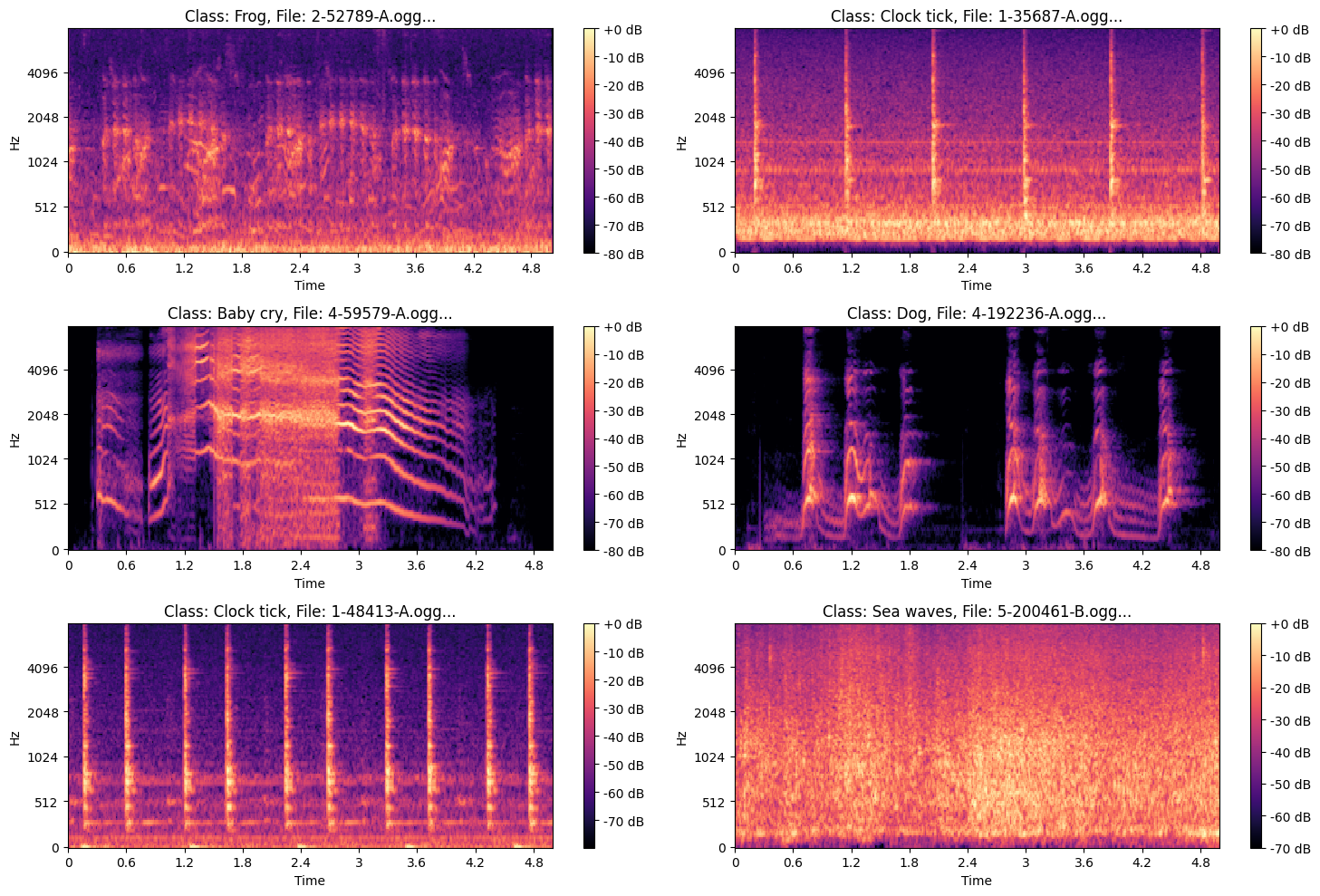
.png?generation=1763570855911665&alt=media)
6. Dataset Validation
After spectrogram creation:
- Corrupted images removed
- Duplicate hashes filtered
- Filename integrity checked
- Class folders validated
df['file_hash'] = df['full_path'].apply(get_hash)
duplicate_hashes = df[df.duplicated(subset=['file_hash'], keep=False)]
This step ensures clean, reliable training data.
7. Building TensorFlow Datasets
The dataset is built with batching, caching, prefetching:
train_ds = tf.data.Dataset.from_tensor_slices((train_paths, train_labels))
train_ds = train_ds.map(load_and_preprocess, num_parallel_calls=AUTOTUNE)
train_ds = train_ds.shuffle(1024).batch(batch_size).prefetch(AUTOTUNE)
I used a simple image-level augmentation pipeline:
data_augmentation = tf.keras.Sequential([
    tf.keras.layers.InputLayer(input_shape=(231, 232, 4)),
    tf.keras.layers.RandomFlip("horizontal"),
    tf.keras.layers.RandomRotation(0.1),
    tf.keras.layers.RandomZoom(0.1),
])
8. CNN Architecture
The CNN captures deep frequency-time patterns across Mel images.
Key features:
- Multiple Conv2D + BatchNorm blocks
- Dropout
- L2 regularization
- Softmax output
model = Sequential([
    data_augmentation,
    Conv2D(32, (3,3), padding='same', activation='relu', kernel_regularizer=l2(weight_decay)),
    BatchNormalization(),
    MaxPooling2D((2,2)),
    Dropout(0.2),
    # ... more layers ...
    Flatten(),
    Dense(num_classes, activation='softmax')
])
9. Training Strategy
reduce_lr = ReduceLROnPlateau(monitor='val_loss', factor=0.5, patience=10)
early_stopping = EarlyStopping(monitor='val_loss', patience=40, restore_best_weights=True)

history = model.fit(
    train_ds,
    validation_data=val_ds,
    epochs=50,
    callbacks=[reduce_lr, early_stopping]
)
The model converges smoothly while avoiding overfitting.
10. Evaluation
Performance is evaluated using:
- Accuracy
- Precision, recall, F1-score
- Confusion matrix
- ROC/AUC curves
y_pred = np.argmax(model.predict(test_ds), axis=1)
print(classification_report(y_true, y_pred, target_names=le.classes_))
Confusion matrix:
sns.heatmap(confusion_matrix(y_true, y_pred), annot=True, cmap='Blues')
plt.title("Confusion Matrix")
plt.show()
11. Saving the Model & Dataset
model.save("Audio_Model_Classification.h5")
shutil.make_archive("/content/spectrograms", 'zip', "/content/spectrograms")
The entire spectrogram dataset is also zipped for sharing or deployment.
Final Notes
This project demonstrates:
- How to clean & prepare raw audio at a professional level
- Audio augmentation best practices
- How Mel spectrograms unlock CNN performance
- A full TensorFlow training pipeline
- Proper evaluation, reporting, and dataset integrity
If you're working on sound recognition, speech tasks, or environmental audio detection, this pipeline gives you a complete production-grade foundation.
Results
Note: Click the image below to view the video showcasing the project’s results.

Note: If the video above is not working, you can access it directly via the link below.