


EllieKini/Herta
Audio-to-Audio • Updated
text stringlengths 0 2k | heading1 stringlengths 3 79 | source_page_url stringclasses 190
values | source_page_title stringclasses 190
values |
|---|---|---|---|
The main Client class for the Python client. This class is used to connect
to a remote Gradio app and call its API endpoints.
| Description | https://gradio.app/docs/python-client/client | Python Client - Client Docs |
from gradio_client import Client
client = Client("abidlabs/whisper-large-v2") connecting to a Hugging Face Space
client.predict("test.mp4", api_name="/predict")
>> What a nice recording! returns the result of the remote API call
client = Client("https://bec81a83-5b5c-471e.gradio.live") conne... | Example usage | https://gradio.app/docs/python-client/client | Python Client - Client Docs |
Parameters ▼
src: str
either the name of the Hugging Face Space to load, (e.g. "abidlabs/whisper-
large-v2") or the full URL (including "http" or "https") of the hosted Gradio
app to load (e.g. "http://mydomain.com/app" or
"https://bec81a83-5b5c-471e.gradio.live/").
token: str | None
d... | Initialization | https://gradio.app/docs/python-client/client | Python Client - Client Docs |
n the remote machine instead.
ssl_verify: bool
default `= True`
if False, skips certificate validation which allows the client to connect to
Gradio apps that are using self-signed certificates.
analytics_enabled: bool
default `= True`
Whether to allow basic telemetry. If None, will u... | Initialization | https://gradio.app/docs/python-client/client | Python Client - Client Docs |
Description
Event listeners allow you to respond to user interactions with the UI
components you've defined in a Gradio Blocks app. When a user interacts with
an element, such as changing a slider value or uploading an image, a function
is called.
Supported Event Listeners
The Client component supports the following... | Event Listeners | https://gradio.app/docs/python-client/client | Python Client - Client Docs |
eters. For hardware upgrades (beyond the basic
CPU tier), you may be required to provide billing information on Hugging Face:
<https://huggingface.co/settings/billing> <br>
Event Parameters
Parameters ▼
args:
The positional arguments to pass to the remote API endpoint. The order of the
arguments mus... | Event Listeners | https://gradio.app/docs/python-client/client | Python Client - Client Docs |
ZeroGPU
ZeroGPU spaces are rate-limited to ensure that a single user does not hog all
of the available GPUs. The limit is controlled by a special token that the
Hugging Face Hub infrastructure adds to all incoming requests to Spaces. This
token is a request header called `X-IP-Token` and its value changes depending
on... | Explaining Rate Limits for | https://gradio.app/docs/python-client/using-zero-gpu-spaces | Python Client - Using Zero Gpu Spaces Docs |
Token
In the following hypothetical example, when a user presses enter in the
textbox, the `generate()` function is called, which calls a second function,
`text_to_image()`. Because the Gradio Client is being instantiated indirectly,
in `text_to_image()`, we will need to extract their token from the `X-IP-
Token` head... | Avoiding Rate Limits by Manually Passing an IP | https://gradio.app/docs/python-client/using-zero-gpu-spaces | Python Client - Using Zero Gpu Spaces Docs |
If you already have a recent version of `gradio`, then the `gradio_client` is
included as a dependency. But note that this documentation reflects the latest
version of the `gradio_client`, so upgrade if you’re not sure!
The lightweight `gradio_client` package can be installed from pip (or pip3)
and is tested to work w... | Installation | https://gradio.app/docs/python-client/introduction | Python Client - Introduction Docs |
Spaces
Start by connecting instantiating a `Client` object and connecting it to a
Gradio app that is running on Hugging Face Spaces.
from gradio_client import Client
client = Client("abidlabs/en2fr") a Space that translates from English to French
You can also connect to private Spaces by pass... | Connecting to a Gradio App on Hugging Face | https://gradio.app/docs/python-client/introduction | Python Client - Introduction Docs |
use
While you can use any public Space as an API, you may get rate limited by
Hugging Face if you make too many requests. For unlimited usage of a Space,
simply duplicate the Space to create a private Space, and then use it to make
as many requests as you’d like!
The `gradio_client` includes a class method: `Client.d... | Duplicating a Space for private | https://gradio.app/docs/python-client/introduction | Python Client - Introduction Docs |
app
If your app is running somewhere else, just provide the full URL instead,
including the “http://” or “https://“. Here’s an example of making predictions
to a Gradio app that is running on a share URL:
from gradio_client import Client
client = Client("https://bec81a83-5b5c-471e.gradio.live")... | Connecting a general Gradio | https://gradio.app/docs/python-client/introduction | Python Client - Introduction Docs |
Once you have connected to a Gradio app, you can view the APIs that are
available to you by calling the `Client.view_api()` method. For the Whisper
Space, we see the following:
Client.predict() Usage Info
---------------------------
Named API endpoints: 1
- predict(audio, api_name="/pre... | Inspecting the API endpoints | https://gradio.app/docs/python-client/introduction | Python Client - Introduction Docs |
As an alternative to running the `.view_api()` method, you can click on the
“Use via API” link in the footer of the Gradio app, which shows us the same
information, along with example usage.
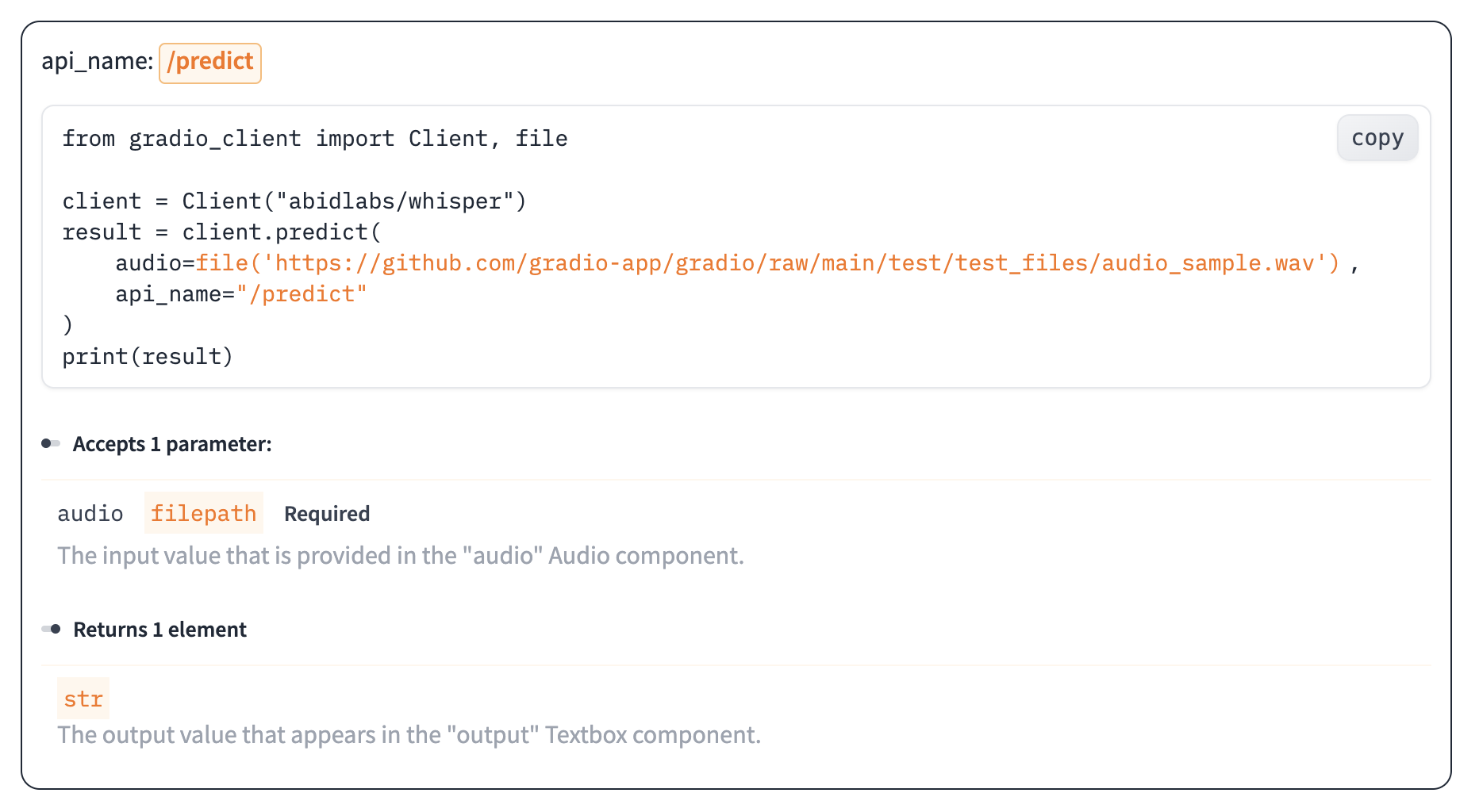
The View API pag... | The “View API” Page | https://gradio.app/docs/python-client/introduction | Python Client - Introduction Docs |
The simplest way to make a prediction is simply to call the `.predict()`
function with the appropriate arguments:
from gradio_client import Client
client = Client("abidlabs/en2fr", api_name='/predict')
client.predict("Hello")
>> Bonjour
If there are multiple parameters, then you sh... | Making a prediction | https://gradio.app/docs/python-client/introduction | Python Client - Introduction Docs |
to the Gradio server and ensures that the file is
preprocessed correctly:
from gradio_client import Client, file
client = Client("abidlabs/whisper")
client.predict(
audio=file("https://audio-samples.github.io/samples/mp3/blizzard_unconditional/sample-0.mp3")
)
>> "My th... | Making a prediction | https://gradio.app/docs/python-client/introduction | Python Client - Introduction Docs |
Oe should note that `.predict()` is a _blocking_ operation as it waits for the
operation to complete before returning the prediction.
In many cases, you may be better off letting the job run in the background
until you need the results of the prediction. You can do this by creating a
`Job` instance using the `.submit(... | Running jobs asynchronously | https://gradio.app/docs/python-client/introduction | Python Client - Introduction Docs |
Alternatively, one can add one or more callbacks to perform actions after the
job has completed running, like this:
from gradio_client import Client
def print_result(x):
print("The translated result is: {x}")
client = Client(space="abidlabs/en2fr")
job = client.submit("... | Adding callbacks | https://gradio.app/docs/python-client/introduction | Python Client - Introduction Docs |
The `Job` object also allows you to get the status of the running job by
calling the `.status()` method. This returns a `StatusUpdate` object with the
following attributes: `code` (the status code, one of a set of defined strings
representing the status. See the `utils.Status` class), `rank` (the current
position of th... | Status | https://gradio.app/docs/python-client/introduction | Python Client - Introduction Docs |
The `Job` class also has a `.cancel()` instance method that cancels jobs that
have been queued but not started. For example, if you run:
client = Client("abidlabs/whisper")
job1 = client.submit(file("audio_sample1.wav"))
job2 = client.submit(file("audio_sample2.wav"))
job1.cancel() will retu... | Cancelling Jobs | https://gradio.app/docs/python-client/introduction | Python Client - Introduction Docs |
Some Gradio API endpoints do not return a single value, rather they return a
series of values. You can get the series of values that have been returned at
any time from such a generator endpoint by running `job.outputs()`:
from gradio_client import Client
client = Client(src="gradio/count_genera... | Generator Endpoints | https://gradio.app/docs/python-client/introduction | Python Client - Introduction Docs |
Gradio demos can include [session state](https://www.gradio.app/guides/state-
in-blocks), which provides a way for demos to persist information from user
interactions within a page session.
For example, consider the following demo, which maintains a list of words that
a user has submitted in a `gr.State` component. Wh... | Demos with Session State | https://gradio.app/docs/python-client/introduction | Python Client - Introduction Docs |
A Job is a wrapper over the Future class that represents a prediction call
that has been submitted by the Gradio client. This class is not meant to be
instantiated directly, but rather is created by the Client.submit() method.
A Job object includes methods to get the status of the prediction call, as
well to get the ... | Description | https://gradio.app/docs/python-client/job | Python Client - Job Docs |
Parameters ▼
future: Future
The future object that represents the prediction call, created by the
Client.submit() method
communicator: Communicator | None
default `= None`
The communicator object that is used to communicate between the client and the
background thread running the job
... | Initialization | https://gradio.app/docs/python-client/job | Python Client - Job Docs |
Description
Event listeners allow you to respond to user interactions with the UI
components you've defined in a Gradio Blocks app. When a user interacts with
an element, such as changing a slider value or uploading an image, a function
is called.
Supported Event Listeners
The Job component supports the following ev... | Event Listeners | https://gradio.app/docs/python-client/job | Python Client - Job Docs |
**Stream From a Gradio app in 5 lines**
Use the `submit` method to get a job you can iterate over.
In python:
from gradio_client import Client
client = Client("gradio/llm_stream")
for result in client.submit("What's the best UI framework in Python?"):
print(result)
... | Ergonomic API 💆 | https://gradio.app/docs/python-client/version-1-release | Python Client - Version 1 Release Docs |
Anything you can do in the UI, you can do with the client:
* 🔐Authentication
* 🛑 Job Cancelling
* ℹ️ Access Queue Position and API
* 📕 View the API information
Here's an example showing how to display the queue position of a pending job:
from gradio_client import Client
client = ... | Transparent Design 🪟 | https://gradio.app/docs/python-client/version-1-release | Python Client - Version 1 Release Docs |
The client can run from pretty much any python and javascript environment
(node, deno, the browser, Service Workers).
Here's an example using the client from a Flask server using gevent:
from gevent import monkey
monkey.patch_all()
from gradio_client import Client
from flask import Fla... | Portable Design ⛺️ | https://gradio.app/docs/python-client/version-1-release | Python Client - Version 1 Release Docs |
Changes
**Python**
* The `serialize` argument of the `Client` class was removed and has no effect.
* The `upload_files` argument of the `Client` was removed.
* All filepaths must be wrapped in the `handle_file` method. For example, `caption = client.predict(handle_file('./dog.jpg'))`.
* The `output_dir` a... | v1.0 Migration Guide and Breaking | https://gradio.app/docs/python-client/version-1-release | Python Client - Version 1 Release Docs |
Gradio applications support programmatic requests from many environments:
* The [Python Client](/docs/python-client): `gradio-client` allows you to make requests from Python environments.
* The [JavaScript Client](/docs/js-client): `@gradio/client` allows you to make requests in TypeScript from the browser or serv... | Gradio Clients | https://gradio.app/docs/third-party-clients/introduction | Third Party Clients - Introduction Docs |
We also encourage the development and use of third party clients built by
the community:
* [Rust Client](/docs/third-party-clients/rust-client): `gradio-rs` built by [@JacobLinCool](https://github.com/JacobLinCool) allows you to make requests in Rust.
* [Powershell Client](https://github.com/rrg92/powershai): `pow... | Community Clients | https://gradio.app/docs/third-party-clients/introduction | Third Party Clients - Introduction Docs |
`gradio-rs` is a Gradio Client in Rust built by
[@JacobLinCool](https://github.com/JacobLinCool). You can find the repo
[here](https://github.com/JacobLinCool/gradio-rs), and more in depth API
documentation [here](https://docs.rs/gradio/latest/gradio/).
| Introduction | https://gradio.app/docs/third-party-clients/rust-client | Third Party Clients - Rust Client Docs |
Here is an example of using BS-RoFormer model to separate vocals and
background music from an audio file.
use gradio::{PredictionInput, Client, ClientOptions};
[tokio::main]
async fn main() {
if std::env::args().len() < 2 {
println!("Please provide an audio file path as a... | Usage | https://gradio.app/docs/third-party-clients/rust-client | Third Party Clients - Rust Client Docs |
cargo install gradio
gr --help
Take [stabilityai/stable-
diffusion-3-medium](https://huggingface.co/spaces/stabilityai/stable-
diffusion-3-medium) HF Space as an example:
> gr list stabilityai/stable-diffusion-3-medium
API Spec for stabilityai/stable-diffusion-3-medium:
/infer
... | Command Line Interface | https://gradio.app/docs/third-party-clients/rust-client | Third Party Clients - Rust Client Docs |
Used to display arbitrary JSON output prettily. As this component does not
accept user input, it is rarely used as an input component.
| Description | https://gradio.app/docs/gradio/json | Gradio - Json Docs |
**Using JSON as an input component.**
How JSON will pass its value to your function:
Type: `dict | list | None`
Passes the JSON value as a `dict` or `list` depending on the value.
Example Code
import gradio as gr
def predict(
value: dict | list | None
):
... | Behavior | https://gradio.app/docs/gradio/json | Gradio - Json Docs |
Parameters ▼
value: str | dict | list | Callable | None
default `= None`
Default value as a valid JSON `str` -- or a `list` or `dict` that can be
serialized to a JSON string. If a function is provided, the function will be
called each time the app loads to set the initial value of this component.
... | Initialization | https://gradio.app/docs/gradio/json | Gradio - Json Docs |
wrap if not sufficient screen space to satisfy this
value. If a certain scale value results in this Component being narrower than
min_width, the min_width parameter will be respected first.
visible: bool | Literal['hidden']
default `= True`
If False, component will be hidden. If "hidden", component wi... | Initialization | https://gradio.app/docs/gradio/json | Gradio - Json Docs |
e
levels deeper than 3 are collapsed.
show_indices: bool
default `= False`
Whether to show numerical indices when displaying the elements of a list
within the JSON object.
height: int | str | None
default `= None`
Height of the JSON component in pixels if a number is passed, or in CS... | Initialization | https://gradio.app/docs/gradio/json | Gradio - Json Docs |
Shortcuts
gradio.JSON
Interface String Shortcut `"json"`
Initialization Uses default values
| Shortcuts | https://gradio.app/docs/gradio/json | Gradio - Json Docs |
zip_to_jsonblocks_xray
| Demos | https://gradio.app/docs/gradio/json | Gradio - Json Docs |
Description
Event listeners allow you to respond to user interactions with the UI
components you've defined in a Gradio Blocks app. When a user interacts with
an element, such as changing a slider value or uploading an image, a function
is called.
Supported Event Listeners
The JSON component supports the following e... | Event Listeners | https://gradio.app/docs/gradio/json | Gradio - Json Docs |
PI docs. Can be a string or None. If
set to a string, the endpoint will be exposed in the API docs with the given
name. If None (default), the name of the function will be used as the API
endpoint.
api_description: str | None | Literal[False]
default `= None`
Description of the API endpoint. Can be a ... | Event Listeners | https://gradio.app/docs/gradio/json | Gradio - Json Docs |
he function is then
*required* to return a tuple of lists (even if there is only 1 output
component), with each list in the tuple corresponding to one output component.
max_batch_size: int
default `= 4`
Maximum number of inputs to batch together if this is called from the queue
(only relevant if batch... | Event Listeners | https://gradio.app/docs/gradio/json | Gradio - Json Docs |
arguments; raw code can access them through `arguments`. Return a list of
values for the output components.
concurrency_limit: int | None | Literal['default']
default `= "default"`
If set, this is the maximum number of this event that can be running
simultaneously. Can be set to None to mean no concur... | Event Listeners | https://gradio.app/docs/gradio/json | Gradio - Json Docs |
n function be called. The validator
receives the same inputs as the main function, including the same keyword
arguments when `inputs_kwargs` is used, so its signature must accept those
keyword names. It should return a `gr.validate()` for each input value.
inputs_kwargs: dict[str, Component | BlockConte... | Event Listeners | https://gradio.app/docs/gradio/json | Gradio - Json Docs |
Mount a gradio.Blocks to an existing FastAPI application.
| Description | https://gradio.app/docs/gradio/mount_gradio_app | Gradio - Mount_Gradio_App Docs |
from fastapi import FastAPI
import gradio as gr
app = FastAPI()
@app.get("/")
def read_main():
return {"message": "This is your main app"}
io = gr.Interface(lambda x: "Hello, " + x + "!", "textbox", "textbox")
app = gr.mount_gradio_app(app, io, path="/gradio")
Then run `uvicorn run:app`... | Example Usage | https://gradio.app/docs/gradio/mount_gradio_app | Gradio - Mount_Gradio_App Docs |
Parameters ▼
app: fastapi.FastAPI
The parent FastAPI application. If it configures its own `CORSMiddleware`,
Gradio will not add its own CORS headers to the mounted app, so that your
`allow_origins` policy is the one that applies.
blocks: gradio.Blocks
The blocks object we want to moun... | Initialization | https://gradio.app/docs/gradio/mount_gradio_app | Gradio - Mount_Gradio_App Docs |
riable or default to True.
app_kwargs: dict[str, Any] | None
default `= None`
Additional keyword arguments to pass to the underlying FastAPI app as a
dictionary of parameter keys and argument values. For example, `{"docs_url":
"/docs"}`
auth: Callable | tuple[str, str] | list[tuple[str... | Initialization | https://gradio.app/docs/gradio/mount_gradio_app | Gradio - Mount_Gradio_App Docs |
default `= None`
List of complete filepaths or parent directories that this gradio app is
allowed to serve. Must be absolute paths. Warning: if you provide directories,
any files in these directories or their subdirectories are accessible to all
users of your app.
blocked_paths: list[str] | None
defa... | Initialization | https://gradio.app/docs/gradio/mount_gradio_app | Gradio - Mount_Gradio_App Docs |
se for SSR. If None, will use
GRADIO_NODE_SERVER_NAME environment variable or search for a node binary in
the system.
node_port: int | None
default `= None`
The port on which the Node server should run. If None, will use
GRADIO_NODE_SERVER_PORT environment variable or find a free port.
... | Initialization | https://gradio.app/docs/gradio/mount_gradio_app | Gradio - Mount_Gradio_App Docs |
head: str | None
default `= None`
Custom html code to insert into the head of the demo webpage. This can be used
to add custom meta tags, multiple scripts, stylesheets, etc. to the page.
head_paths: str | Path | list[str | Path] | None
default `= None`
Custom html code as a pathlib.Pat... | Initialization | https://gradio.app/docs/gradio/mount_gradio_app | Gradio - Mount_Gradio_App Docs |
Column is a layout element within Blocks that renders all children
vertically. The widths of columns can be set through the `scale` and
`min_width` parameters. If a certain scale results in a column narrower than
min_width, the min_width parameter will win.
| Description | https://gradio.app/docs/gradio/column | Gradio - Column Docs |
with gr.Blocks() as demo:
with gr.Row():
with gr.Column(scale=1):
text1 = gr.Textbox()
text2 = gr.Textbox()
with gr.Column(scale=4):
btn1 = gr.Button("Button 1")
btn2 = gr.Button("Button 2")
| Example Usage | https://gradio.app/docs/gradio/column | Gradio - Column Docs |
Parameters ▼
scale: int
default `= 1`
relative width compared to adjacent Columns. For example, if Column A has
scale=2, and Column B has scale=1, A will be twice as wide as B.
min_width: int
default `= 320`
minimum pixel width of Column, will wrap if not sufficient screen space to
s... | Initialization | https://gradio.app/docs/gradio/column | Gradio - Column Docs |
ved_by_key: list[str] | str | None
default `= None`
A list of parameters from this component's constructor. Inside a gr.render()
function, if a component is re-rendered with the same key, these (and only
these) parameters will be preserved in the UI (if they have been changed by
the user or an event listener) instead... | Initialization | https://gradio.app/docs/gradio/column | Gradio - Column Docs |
Creates a chatbot that displays user-submitted messages and responses.
Supports a subset of Markdown including bold, italics, code, tables. Also
supports audio/video/image files, which are displayed in the Chatbot, and
other kinds of files which are displayed as links. This component is usually
used as an output compon... | Description | https://gradio.app/docs/gradio/chatbot | Gradio - Chatbot Docs |
The Chatbot component accepts a list of messages, where each message is a
dictionary with `role` and `content` keys. This format is compatible with the
message format expected by most LLM APIs (OpenAI, Claude, HuggingChat, etc.),
making it easy to pipe model outputs directly into the component.
The `role` key should b... | Behavior | https://gradio.app/docs/gradio/chatbot | Gradio - Chatbot Docs |
Parameters ▼
value: list[MessageDict | Message] | Callable | None
default `= None`
Default list of messages to show in chatbot, where each message is of the
format {"role": "user", "content": "Help me."}. Role can be one of "user",
"assistant", or "system". Content should be either text, or media pass... | Initialization | https://gradio.app/docs/gradio/chatbot | Gradio - Chatbot Docs |
wide
as B. Should be an integer. scale applies in Rows, and to top-level Components
in Blocks where fill_height=True.
min_width: int
default `= 160`
minimum pixel width, will wrap if not sufficient screen space to satisfy this
value. If a certain scale value results in this Component being narrower th... | Initialization | https://gradio.app/docs/gradio/chatbot | Gradio - Chatbot Docs |
parameters from this component's constructor. Inside a gr.render()
function, if a component is re-rendered with the same key, these (and only
these) parameters will be preserved in the UI (if they have been changed by
the user or an event listener) instead of re-rendered based on the values
provided during constructor... | Initialization | https://gradio.app/docs/gradio/chatbot | Gradio - Chatbot Docs |
open delimiter (str), "right": close
delimiter (str), "display": whether to display in newline (bool)} that will be
used to render LaTeX expressions. If not provided, `latex_delimiters` is set
to `[{ "left": "$$", "right": "$$", "display": True }]`, so only expressions
enclosed in $$ delimiters will be rendered as LaTe... | Initialization | https://gradio.app/docs/gradio/chatbot | Gradio - Chatbot Docs |
order). Pass
None for either the user or bot image to skip. Must be within the working
directory of the Gradio app or an external URL.
sanitize_html: bool
default `= True`
If False, will disable HTML sanitization for chatbot messages. This is not
recommended, as it can lead to security vulnerabilities... | Initialization | https://gradio.app/docs/gradio/chatbot | Gradio - Chatbot Docs |
tered
vertically and horizontally in the Chatbot. Supports Markdown and HTML. If
None, no placeholder is displayed.
examples: list[ExampleMessage] | None
default `= None`
A list of example messages to display in the chatbot before any user/assistant
messages are shown. Each example should be a diction... | Initialization | https://gradio.app/docs/gradio/chatbot | Gradio - Chatbot Docs |
and displayed in a separate collapsible
message with metadata={"title": "Reasoning"}. For example, [("<thinking>",
"</thinking>")] will extract content between <thinking> and </thinking> tags.
Each thinking block will be displayed as a separate collapsible message before
the main response. If None (default), no automa... | Initialization | https://gradio.app/docs/gradio/chatbot | Gradio - Chatbot Docs |
Shortcuts
gradio.Chatbot
Interface String Shortcut `"chatbot"`
Initialization Uses default values
| Shortcuts | https://gradio.app/docs/gradio/chatbot | Gradio - Chatbot Docs |
**Displaying Thoughts/Tool Usage**
You can provide additional metadata regarding any tools used to generate the
response. This is useful for displaying the thought process of LLM agents. For
example,
def generate_response(history):
history.append(
ChatMessage(role="assistant",
... | Examples | https://gradio.app/docs/gradio/chatbot | Gradio - Chatbot Docs |
deo("https://github.com/gradio-app/gradio/raw/main/gradio/media_assets/videos/world.mp4")}
]
with gr.Blocks() as demo:
chatbot = gr.Chatbot()
button = gr.Button("Load audio and video")
button.click(load, None, chatbot)
demo.launch()
| Examples | https://gradio.app/docs/gradio/chatbot | Gradio - Chatbot Docs |
chatbot_simplechatbot_streamingchatbot_with_toolschatbot_core_components
| Demos | https://gradio.app/docs/gradio/chatbot | Gradio - Chatbot Docs |
Description
Event listeners allow you to respond to user interactions with the UI
components you've defined in a Gradio Blocks app. When a user interacts with
an element, such as changing a slider value or uploading an image, a function
is called.
Supported Event Listeners
The Chatbot component supports the followin... | Event Listeners | https://gradio.app/docs/gradio/chatbot | Gradio - Chatbot Docs |
s event has SelectData of type gradio.SelectData that carries
information, accessible through SelectData.index and SelectData.value. See
SelectData documentation on how to use this event data.
Chatbot.option_select(fn, ···)
This listener is triggered when the user clicks on an option from within the
Cha... | Event Listeners | https://gradio.app/docs/gradio/chatbot | Gradio - Chatbot Docs |
ckContext] | Set[Component | BlockContext] | None
default `= None`
List of gradio.components to use as outputs. If the function returns no
outputs, this should be an empty list.
api_name: str | None
default `= None`
defines how the endpoint appears in the API docs. Can be a string or None. If
set to... | Event Listeners | https://gradio.app/docs/gradio/chatbot | Gradio - Chatbot Docs |
f the gradio app.
batch: bool
default `= False`
If True, then the function should process a batch of inputs, meaning that it
should accept a list of input values for each parameter. The lists should be
of equal length (and be up to length `max_batch_size`). The function is then
*required* to return a ... | Event Listeners | https://gradio.app/docs/gradio/chatbot | Gradio - Chatbot Docs |
d submission after the
pending event is complete.
js: str | Literal[True] | None
default `= None`
Optional frontend JavaScript to run before 'fn', provided as either a function
or a raw code string. A function receives the values of 'inputs' and 'outputs'
as arguments; raw code can access them through... | Event Listeners | https://gradio.app/docs/gradio/chatbot | Gradio - Chatbot Docs |
renders when the key is
identical.
validator: Callable | None
default `= None`
Optional validation function to run before the main function. If provided,
this function will be executed first with queue=False, and only if it
completes successfully will the main function be called. The validator
receive... | Event Listeners | https://gradio.app/docs/gradio/chatbot | Gradio - Chatbot Docs |
Helper Classes | https://gradio.app/docs/gradio/chatbot | Gradio - Chatbot Docs | |
gradio.ChatMessage(···)
Description
A dataclass that represents a message in the Chatbot component (with
type="messages"). The only required field is `content`. The value of
`gr.Chatbot` is a list of these dataclasses.
Parameters ▼
content: MessageContent | list[MessageContent]
The content of the me... | ChatMessage | https://gradio.app/docs/gradio/chatbot | Gradio - Chatbot Docs |
A typed dictionary to represent metadata for a message in the Chatbot
component. An instance of this dictionary is used for the `metadata` field in
a ChatMessage when the chat message should be displayed as a thought.
Keys ▼
title: str
The title of the 'thought' message. Only required field.
... | MetadataDict | https://gradio.app/docs/gradio/chatbot | Gradio - Chatbot Docs |
A typed dictionary to represent an option in a ChatMessage. A list of these
dictionaries is used for the `options` field in a ChatMessage.
Keys ▼
value: str
The value to return when the option is selected.
label: str
The text to display in the option, if different from the value.
[Ch... | OptionDict | https://gradio.app/docs/gradio/chatbot | Gradio - Chatbot Docs |
ChatInterface is Gradio's high-level abstraction for creating chatbot UIs,
and allows you to create a web-based demo around a chatbot model in a few
lines of code. Only one parameter is required: fn, which takes a function that
governs the response of the chatbot based on the user input and chat history.
Additional par... | Description | https://gradio.app/docs/gradio/chatinterface | Gradio - Chatinterface Docs |
**Basic Example** : A chatbot that echoes back the users’s message
import gradio as gr
def echo(message, history):
return message
demo = gr.ChatInterface(fn=echo, examples=["hello", "hola", "merhaba"], title="Echo Bot")
demo.launch()
**Custom Chatbot** : A `gr.ChatInterface... | Example Usage | https://gradio.app/docs/gradio/chatinterface | Gradio - Chatinterface Docs |
Parameters ▼
fn: Callable
the function to wrap the chat interface around. The function should accept two parameters: a `str` representing the input message and `list` of openai-style dictionaries: {"role": "user" | "assistant", "content": `str` | {"path": `str`} | `gr.Component`} representing the chat ... | Initialization | https://gradio.app/docs/gradio/chatinterface | Gradio - Chatinterface Docs |
cks, then the components will be
displayed under the chatbot, in an accordion. The values of these components
will be passed into `fn` as arguments in order after the chat history.
additional_inputs_accordion: str | Accordion | None
default `= None`
if a string is provided, this is the label of the `g... | Initialization | https://gradio.app/docs/gradio/chatinterface | Gradio - Chatinterface Docs |
atbot.
examples_label: str | I18nData | None
default `= "Examples"`
the label to use for the examples component when examples are displayed below
the chatbot because additional inputs are provided.
example_labels: list[str] | None
default `= None`
labels for the examples, to be displ... | Initialization | https://gradio.app/docs/gradio/chatinterface | Gradio - Chatinterface Docs |
r all users after the first use by any user of the app. If None, will
use the GRADIO_CACHE_MODE environment variable if defined, or default to
"eager".
title: str | I18nData | None
default `= None`
a title for the interface; if provided, appears above chatbot in large font.
Also used as the tab title ... | Initialization | https://gradio.app/docs/gradio/chatinterface | Gradio - Chatinterface Docs |
essage appears, unless the user scrolls up. If False, will not scroll to the
bottom of the chatbot automatically.
submit_btn: str | bool | None
default `= True`
If True, will show a submit button with a submit icon within the textbox. If a
string, will use that string as the submit button text in plac... | Initialization | https://gradio.app/docs/gradio/chatinterface | Gradio - Chatinterface Docs |
as well as a runtime display in
the upper right corner, "minimal" only shows the runtime display, "hidden"
shows no progress animation at all
fill_height: bool
default `= True`
if True, the chat interface will expand to the height of window.
fill_width: bool
default `= False`
Whether... | Initialization | https://gradio.app/docs/gradio/chatinterface | Gradio - Chatinterface Docs |
chatinterface_random_responsechatinterface_streaming_echochatinterface_artifacts
[Creating A Chatbot Fast](../../guides/creating-a-chatbot-fast/)[Chatinterface
Examples](../../guides/chatinterface-examples/)[Agents And Tool
Usage](../../guides/agents-and-tool-usage/)[Chatbot Specific
Events](../../guides/chatbot-speci... | Demos | https://gradio.app/docs/gradio/chatinterface | Gradio - Chatinterface Docs |
A TabbedInterface is created by providing a list of Interfaces or Blocks,
each of which gets rendered in a separate tab. Only the components from the
Interface/Blocks will be rendered in the tab.
| Description | https://gradio.app/docs/gradio/tabbedinterface | Gradio - Tabbedinterface Docs |
Parameters ▼
interface_list: list[Blocks]
A list of Interfaces (or Blocks) to be rendered in the tabs.
tab_names: list[str] | None
default `= None`
A list of tab names. If None, the tab names will be "Tab 1", "Tab 2", etc.
title: str | None
default `= None`
The tab t... | Initialization | https://gradio.app/docs/gradio/tabbedinterface | Gradio - Tabbedinterface Docs |
tabbed_interface_lite
| Demos | https://gradio.app/docs/gradio/tabbedinterface | Gradio - Tabbedinterface Docs |
Creates a color picker for user to select a color as string input. Can be
used as an input to pass a color value to a function or as an output to
display a color value.
| Description | https://gradio.app/docs/gradio/colorpicker | Gradio - Colorpicker Docs |
**Using ColorPicker as an input component.**
How ColorPicker will pass its value to your function:
Type: `str | None`
Passes selected color value as a hex `str` into the function.
Example Code
import gradio as gr
def predict(
value: str | None
):
... | Behavior | https://gradio.app/docs/gradio/colorpicker | Gradio - Colorpicker Docs |
Parameters ▼
value: str | Callable | None
default `= None`
default color hex code to provide in color picker. If a function is provided,
the function will be called each time the app loads to set the initial value
of this component.
label: str | I18nData | None
default `= None`
the l... | Initialization | https://gradio.app/docs/gradio/colorpicker | Gradio - Colorpicker Docs |
to top-level Components
in Blocks where fill_height=True.
min_width: int
default `= 160`
minimum pixel width, will wrap if not sufficient screen space to satisfy this
value. If a certain scale value results in this Component being narrower than
min_width, the min_width parameter will be respected fir... | Initialization | https://gradio.app/docs/gradio/colorpicker | Gradio - Colorpicker Docs |
render()
function, if a component is re-rendered with the same key, these (and only
these) parameters will be preserved in the UI (if they have been changed by
the user or an event listener) instead of re-rendered based on the values
provided during constructor.
| Initialization | https://gradio.app/docs/gradio/colorpicker | Gradio - Colorpicker Docs |
Shortcuts
gradio.ColorPicker
Interface String Shortcut `"colorpicker"`
Initialization Uses default values
| Shortcuts | https://gradio.app/docs/gradio/colorpicker | Gradio - Colorpicker Docs |
color_picker
| Demos | https://gradio.app/docs/gradio/colorpicker | Gradio - Colorpicker Docs |
Description
Event listeners allow you to respond to user interactions with the UI
components you've defined in a Gradio Blocks app. When a user interacts with
an element, such as changing a slider value or uploading an image, a function
is called.
Supported Event Listeners
The ColorPicker component supports the foll... | Event Listeners | https://gradio.app/docs/gradio/colorpicker | Gradio - Colorpicker Docs |
No dataset card yet