

The dataset viewer is not available because its heuristics could not detect any supported data files. You can try uploading some data files, or configuring the data files location manually.
HEARTS Data Samples


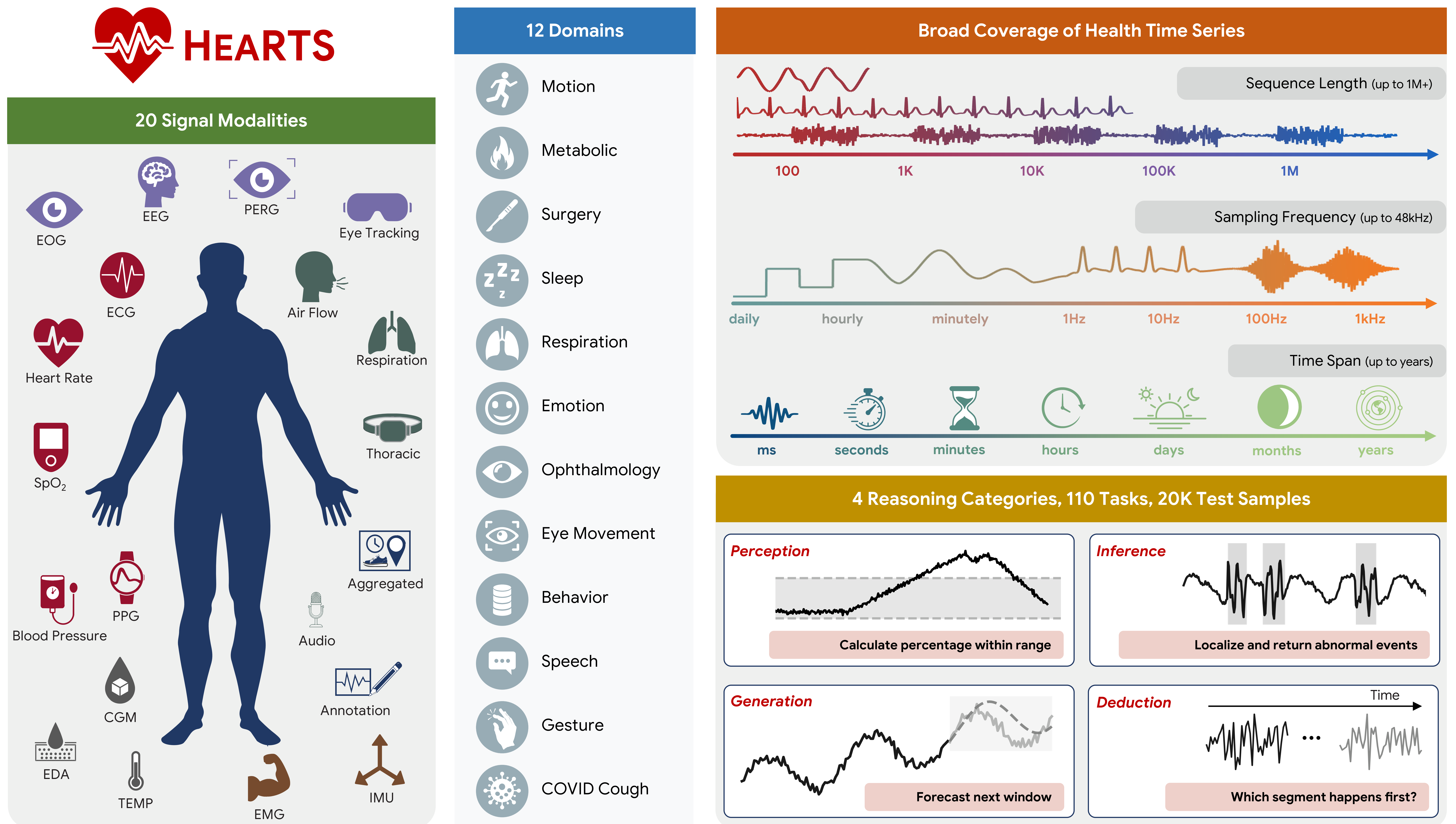
This repository hosts the fixed ("frozen") test cases used by the HEARTS benchmark. Each file is a Python pickle (.pkl) containing one test-case payload.
Quick Links
- Dataset (this repo): https://huggingface.co/datasets/yang-ai-lab/HEARTS
- Code (HEARTS framework): https://github.com/yang-ai-lab/HEARTS
Contents
Folder Layout
All samples follow this pattern:
<dataset>/<task>/*.pkl
Example:
<root>/
  cgmacros/
    cgm_stat_calculation/
      0.pkl
      1.pkl
  vitaldb/
    some_task/
      0.pkl
Conventions:
<dataset>: dataset identifier (e.g.,cgmacros,vitaldb)<task>: task identifier within that datasetN.pkl: N-th fixed test case for that dataset/task
Download
Option A: Clone (recommended for binary files; may require Git LFS)
git lfs install
git clone https://huggingface.co/datasets/yang-ai-lab/HEARTS
Option B: Download programmatically (Python)
from huggingface_hub import snapshot_download

local_dir = snapshot_download(
    repo_id="yang-ai-lab/HEARTS",
    repo_type="dataset",
)
print("Downloaded to:", local_dir)
Tip: Download only a subset via allow_patterns (reduces disk/network)
from huggingface_hub import snapshot_download

local_dir = snapshot_download(
    repo_id="yang-ai-lab/HEARTS",
    repo_type="dataset",
    allow_patterns=[
        "cgmacros/cgm_stat_calculation/*.pkl",
    ],
)
print("Downloaded to:", local_dir)
Use with HEARTS
In the HEARTS codebase, the root directory you downloaded/cloned is the fix_test_cases_dir.
uv run run_exp_freeze.py \
  --fix-test-cases-dir /path/to/HEARTS \
  --dataset-name cgmacros \
  --task cgm_stat_calculation
Inspect / Load a Sample
Security note: Python pickles can execute code when loaded. Only unpickle files you trust.
import pickle
from pathlib import Path

root = Path("/path/to/HEARTS")
sample_path = root / "<dataset>" / "<task>" / "0.pkl"

with sample_path.open("rb") as f:
    obj = pickle.load(f)

print(type(obj))
print(obj)
List available datasets/tasks:
from pathlib import Path

root = Path("/path/to/HEARTS")

for dataset_dir in sorted([p for p in root.iterdir() if p.is_dir()]):
    task_dirs = sorted([p for p in dataset_dir.iterdir() if p.is_dir()])
    print(dataset_dir.name, "tasks:", [p.name for p in task_dirs])
Notes
- These files are intended to be immutable inputs for reproducible evaluation.
- Pickled objects can be code/version-dependent; if you see load/format issues, align your HEARTS code version with the data release.
- Downloads last month
- 11