Instructions to use mfielding92/UD-2.0-Qwen3.6-35B-A3B-Claude-4.6-Opus-Reasoning-Distilled-GGUF with libraries, inference providers, notebooks, and local apps. Follow these links to get started.
- Libraries
- Transformers
How to use mfielding92/UD-2.0-Qwen3.6-35B-A3B-Claude-4.6-Opus-Reasoning-Distilled-GGUF with Transformers:
# Use a pipeline as a high-level helper from transformers import pipeline pipe = pipeline("image-text-to-text", model="mfielding92/UD-2.0-Qwen3.6-35B-A3B-Claude-4.6-Opus-Reasoning-Distilled-GGUF") messages = [ { "role": "user", "content": [ {"type": "image", "url": "https://huggingface.co/datasets/huggingface/documentation-images/resolve/main/p-blog/candy.JPG"}, {"type": "text", "text": "What animal is on the candy?"} ] }, ] pipe(text=messages)# Load model directly from transformers import AutoModel model = AutoModel.from_pretrained("mfielding92/UD-2.0-Qwen3.6-35B-A3B-Claude-4.6-Opus-Reasoning-Distilled-GGUF", device_map="auto") - Notebooks
- Google Colab
- Kaggle
- Local Apps Settings
- llama.cpp
How to use mfielding92/UD-2.0-Qwen3.6-35B-A3B-Claude-4.6-Opus-Reasoning-Distilled-GGUF with llama.cpp:
Install (macOS, Linux)
curl -LsSf https://llama.app/install.sh | sh # Start a local OpenAI-compatible server with a web UI: llama serve -hf mfielding92/UD-2.0-Qwen3.6-35B-A3B-Claude-4.6-Opus-Reasoning-Distilled-GGUF:UD-Q4_K_M # Run inference directly in the terminal: llama cli -hf mfielding92/UD-2.0-Qwen3.6-35B-A3B-Claude-4.6-Opus-Reasoning-Distilled-GGUF:UD-Q4_K_M
Install from WinGet (Windows)
winget install llama.cpp # Start a local OpenAI-compatible server with a web UI: llama serve -hf mfielding92/UD-2.0-Qwen3.6-35B-A3B-Claude-4.6-Opus-Reasoning-Distilled-GGUF:UD-Q4_K_M # Run inference directly in the terminal: llama cli -hf mfielding92/UD-2.0-Qwen3.6-35B-A3B-Claude-4.6-Opus-Reasoning-Distilled-GGUF:UD-Q4_K_M
Use pre-built binary
# Download pre-built binary from: # https://github.com/ggerganov/llama.cpp/releases # Start a local OpenAI-compatible server with a web UI: ./llama-server -hf mfielding92/UD-2.0-Qwen3.6-35B-A3B-Claude-4.6-Opus-Reasoning-Distilled-GGUF:UD-Q4_K_M # Run inference directly in the terminal: ./llama-cli -hf mfielding92/UD-2.0-Qwen3.6-35B-A3B-Claude-4.6-Opus-Reasoning-Distilled-GGUF:UD-Q4_K_M
Build from source code
git clone https://github.com/ggerganov/llama.cpp.git cd llama.cpp cmake -B build cmake --build build -j --target llama-server llama-cli # Start a local OpenAI-compatible server with a web UI: ./build/bin/llama-server -hf mfielding92/UD-2.0-Qwen3.6-35B-A3B-Claude-4.6-Opus-Reasoning-Distilled-GGUF:UD-Q4_K_M # Run inference directly in the terminal: ./build/bin/llama-cli -hf mfielding92/UD-2.0-Qwen3.6-35B-A3B-Claude-4.6-Opus-Reasoning-Distilled-GGUF:UD-Q4_K_M
Use Docker
docker model run hf.co/mfielding92/UD-2.0-Qwen3.6-35B-A3B-Claude-4.6-Opus-Reasoning-Distilled-GGUF:UD-Q4_K_M
- LM Studio
- Jan
- vLLM
How to use mfielding92/UD-2.0-Qwen3.6-35B-A3B-Claude-4.6-Opus-Reasoning-Distilled-GGUF with vLLM:
Install from pip and serve model
# Install vLLM from pip: pip install vllm # Start the vLLM server: vllm serve "mfielding92/UD-2.0-Qwen3.6-35B-A3B-Claude-4.6-Opus-Reasoning-Distilled-GGUF" # Call the server using curl (OpenAI-compatible API): curl -X POST "http://localhost:8000/v1/chat/completions" \ -H "Content-Type: application/json" \ --data '{ "model": "mfielding92/UD-2.0-Qwen3.6-35B-A3B-Claude-4.6-Opus-Reasoning-Distilled-GGUF", "messages": [ { "role": "user", "content": [ { "type": "text", "text": "Describe this image in one sentence." }, { "type": "image_url", "image_url": { "url": "https://cdn.britannica.com/61/93061-050-99147DCE/Statue-of-Liberty-Island-New-York-Bay.jpg" } } ] } ] }'Use Docker
docker model run hf.co/mfielding92/UD-2.0-Qwen3.6-35B-A3B-Claude-4.6-Opus-Reasoning-Distilled-GGUF:UD-Q4_K_M
- SGLang
How to use mfielding92/UD-2.0-Qwen3.6-35B-A3B-Claude-4.6-Opus-Reasoning-Distilled-GGUF with SGLang:
Install from pip and serve model
# Install SGLang from pip: pip install sglang # Start the SGLang server: python3 -m sglang.launch_server \ --model-path "mfielding92/UD-2.0-Qwen3.6-35B-A3B-Claude-4.6-Opus-Reasoning-Distilled-GGUF" \ --host 0.0.0.0 \ --port 30000 # Call the server using curl (OpenAI-compatible API): curl -X POST "http://localhost:30000/v1/chat/completions" \ -H "Content-Type: application/json" \ --data '{ "model": "mfielding92/UD-2.0-Qwen3.6-35B-A3B-Claude-4.6-Opus-Reasoning-Distilled-GGUF", "messages": [ { "role": "user", "content": [ { "type": "text", "text": "Describe this image in one sentence." }, { "type": "image_url", "image_url": { "url": "https://cdn.britannica.com/61/93061-050-99147DCE/Statue-of-Liberty-Island-New-York-Bay.jpg" } } ] } ] }'Use Docker images
docker run --gpus all \ --shm-size 32g \ -p 30000:30000 \ -v ~/.cache/huggingface:/root/.cache/huggingface \ --env "HF_TOKEN=<secret>" \ --ipc=host \ lmsysorg/sglang:latest \ python3 -m sglang.launch_server \ --model-path "mfielding92/UD-2.0-Qwen3.6-35B-A3B-Claude-4.6-Opus-Reasoning-Distilled-GGUF" \ --host 0.0.0.0 \ --port 30000 # Call the server using curl (OpenAI-compatible API): curl -X POST "http://localhost:30000/v1/chat/completions" \ -H "Content-Type: application/json" \ --data '{ "model": "mfielding92/UD-2.0-Qwen3.6-35B-A3B-Claude-4.6-Opus-Reasoning-Distilled-GGUF", "messages": [ { "role": "user", "content": [ { "type": "text", "text": "Describe this image in one sentence." }, { "type": "image_url", "image_url": { "url": "https://cdn.britannica.com/61/93061-050-99147DCE/Statue-of-Liberty-Island-New-York-Bay.jpg" } } ] } ] }' - Ollama
How to use mfielding92/UD-2.0-Qwen3.6-35B-A3B-Claude-4.6-Opus-Reasoning-Distilled-GGUF with Ollama:
ollama run hf.co/mfielding92/UD-2.0-Qwen3.6-35B-A3B-Claude-4.6-Opus-Reasoning-Distilled-GGUF:UD-Q4_K_M
- Unsloth Studio
How to use mfielding92/UD-2.0-Qwen3.6-35B-A3B-Claude-4.6-Opus-Reasoning-Distilled-GGUF with Unsloth Studio:
Install Unsloth Studio (macOS, Linux, WSL)
curl -fsSL https://unsloth.ai/install.sh | sh # Run unsloth studio unsloth studio -H 0.0.0.0 -p 8888 # Then open http://localhost:8888 in your browser # Search for mfielding92/UD-2.0-Qwen3.6-35B-A3B-Claude-4.6-Opus-Reasoning-Distilled-GGUF to start chatting
Install Unsloth Studio (Windows)
irm https://unsloth.ai/install.ps1 | iex # Run unsloth studio unsloth studio -H 0.0.0.0 -p 8888 # Then open http://localhost:8888 in your browser # Search for mfielding92/UD-2.0-Qwen3.6-35B-A3B-Claude-4.6-Opus-Reasoning-Distilled-GGUF to start chatting
Using HuggingFace Spaces for Unsloth
# No setup required # Open https://huggingface.co/spaces/unsloth/studio in your browser # Search for mfielding92/UD-2.0-Qwen3.6-35B-A3B-Claude-4.6-Opus-Reasoning-Distilled-GGUF to start chatting
- Pi
How to use mfielding92/UD-2.0-Qwen3.6-35B-A3B-Claude-4.6-Opus-Reasoning-Distilled-GGUF with Pi:
Start the llama.cpp server
# Install llama.cpp: brew install llama.cpp # Start a local OpenAI-compatible server: llama serve -hf mfielding92/UD-2.0-Qwen3.6-35B-A3B-Claude-4.6-Opus-Reasoning-Distilled-GGUF:UD-Q4_K_M
Configure the model in Pi
# Install Pi: npm install -g @mariozechner/pi-coding-agent # Add to ~/.pi/agent/models.json: { "providers": { "llama-cpp": { "baseUrl": "http://localhost:8080/v1", "api": "openai-completions", "apiKey": "none", "models": [ { "id": "mfielding92/UD-2.0-Qwen3.6-35B-A3B-Claude-4.6-Opus-Reasoning-Distilled-GGUF:UD-Q4_K_M" } ] } } }Run Pi
# Start Pi in your project directory: pi
- OpenClaw new
How to use mfielding92/UD-2.0-Qwen3.6-35B-A3B-Claude-4.6-Opus-Reasoning-Distilled-GGUF with OpenClaw:
Start the llama.cpp server
# Install llama.cpp: brew install llama.cpp # Start a local OpenAI-compatible server: llama serve -hf mfielding92/UD-2.0-Qwen3.6-35B-A3B-Claude-4.6-Opus-Reasoning-Distilled-GGUF:UD-Q4_K_M
Configure OpenClaw
# Install OpenClaw: npm install -g openclaw@latest # Register the local server and set it as the default model: openclaw onboard --non-interactive --mode local \ --auth-choice custom-api-key \ --custom-base-url http://127.0.0.1:8080/v1 \ --custom-model-id "mfielding92/UD-2.0-Qwen3.6-35B-A3B-Claude-4.6-Opus-Reasoning-Distilled-GGUF:UD-Q4_K_M" \ --custom-provider-id llama-cpp \ --custom-compatibility openai \ --custom-text-input \ --accept-risk \ --skip-health
Run OpenClaw
openclaw agent --local --agent main --message "Hello from Hugging Face"
- Docker Model Runner
How to use mfielding92/UD-2.0-Qwen3.6-35B-A3B-Claude-4.6-Opus-Reasoning-Distilled-GGUF with Docker Model Runner:
docker model run hf.co/mfielding92/UD-2.0-Qwen3.6-35B-A3B-Claude-4.6-Opus-Reasoning-Distilled-GGUF:UD-Q4_K_M
- Lemonade
How to use mfielding92/UD-2.0-Qwen3.6-35B-A3B-Claude-4.6-Opus-Reasoning-Distilled-GGUF with Lemonade:
Pull the model
# Download Lemonade from https://lemonade-server.ai/ lemonade pull mfielding92/UD-2.0-Qwen3.6-35B-A3B-Claude-4.6-Opus-Reasoning-Distilled-GGUF:UD-Q4_K_M
Run and chat with the model
lemonade run user.UD-2.0-Qwen3.6-35B-A3B-Claude-4.6-Opus-Reasoning-Distilled-GGUF-UD-Q4_K_M
List all available models
lemonade list
- Hermes Agent
How to use mfielding92/UD-2.0-Qwen3.6-35B-A3B-Claude-4.6-Opus-Reasoning-Distilled-GGUF with Hermes Agent:
Start the llama.cpp server
# Install llama.cpp: brew install llama.cpp # Start a local OpenAI-compatible server: llama serve -hf mfielding92/UD-2.0-Qwen3.6-35B-A3B-Claude-4.6-Opus-Reasoning-Distilled-GGUF:UD-Q4_K_M
Configure Hermes
# Install Hermes: curl -fsSL https://hermes-agent.nousresearch.com/install.sh | bash hermes setup # Point Hermes at the local server: hermes config set model.provider custom hermes config set model.base_url http://127.0.0.1:8080/v1 hermes config set model.default mfielding92/UD-2.0-Qwen3.6-35B-A3B-Claude-4.6-Opus-Reasoning-Distilled-GGUF:UD-Q4_K_M
Run Hermes
hermes
- Atomic Chat
Qwen3.6-35B-A3B-Claude-4.6-Opus-Reasoning-Distilled — UD 2.0 GGUF
Unsloth Dynamic 2.0 (UD) GGUF quants of hesamation/Qwen3.6-35B-A3B-Claude-4.6-Opus-Reasoning-Distilled.
- UD 2.0 recipes extracted from
unsloth/Qwen3.6-35B-A3B-GGUF - imatrix from the same repo
- Per-tensor quant overrides applied via stock
llama.cpp's--tensor-type
Recommended quants
| Quant | Approx size | Notes |
|---|---|---|
UD-Q4_K_XL |
best quality/size ratio for most users | recommended default |
UD-Q5_K_M |
higher quality | if you have headroom |
UD-Q3_K_XL |
smaller, still very usable | tight VRAM |
UD-Q2_K_XL |
extreme compression | budget setups |
Files appear here as they finish quantizing. See the file list below.
Run with llama.cpp
./llama.cpp/llama-cli \
--model Qwen3.6-35B-A3B-Claude-4.6-Opus-Reasoning-Distilled-UD-Q4_K_XL.gguf \
--temp 0.6 --top-p 0.95 --top-k 20 --min-p 0.0 \
--ctx-size 16384 --n-gpu-layers 99
From original model:
🔥 Qwen3.6-35B-A3B-Claude-4.6-Opus-Reasoning-Distilled
A reasoning SFT fine-tune of Qwen/Qwen3.6-35B-A3B on chain-of-thought (CoT) distillation mostly sourced from Claude Opus 4.6. The goal is to preserve Qwen3.6's strong agentic coding and reasoning base while nudging the model toward structured Claude Opus-style reasoning traces and more stable long-form problem solving.
The training path is text-only. The Qwen3.6 base architecture includes a vision encoder, but this fine-tuning run did not train on image or video examples.
- Developed by: @hesamation
- Base model:
Qwen/Qwen3.6-35B-A3B - License: apache-2.0
This fine-tuning run is inspired by Jackrong/Qwen3.5-27B-Claude-4.6-Opus-Reasoning-Distilled, including the notebook/training workflow style and Claude Opus reasoning-distillation direction.
Benchmark Results
The MMLU-Pro pass used 70 total questions per model: --limit 5 across 14 MMLU-Pro subjects. Treat this as a smoke/comparative check, not a release-quality full benchmark.
| Benchmark | Harness | Samples per model | Setting | Metric | Base model | Fine-tuned merged model | Delta |
|---|---|---|---|---|---|---|---|
| MMLU-Pro overall | lm-evaluation-harness | 70 | --limit 5 across 14 subjects |
exact_match, custom-extract | 42.86% | 75.71% | +32.85 pp |
Base model: Qwen/Qwen3.6-35B-A3B. Fine-tuned model: hesamation/Qwen3.6-35B-A3B-Claude-4.6-Opus-Reasoning-Distilled.
Community benchmarks welcome
To better understand this fine-tuned model's capabilities, I welcome independent benchmark results. If you run evaluations, please include the benchmark name, harness/script, sample count, decoding settings, and raw logs or result files when possible.
Share results by opening a PR/discussion or DMing @hesamation on X.
Base Qwen3.6 Highlights
This release delivers substantial upgrades, particularly in:
- Agentic Coding: the model now handles frontend workflows and repository-level reasoning with greater fluency and precision.
- Thinking Preservation: Qwen introduced a new option to retain reasoning context from historical messages, streamlining iterative development and reducing overhead.
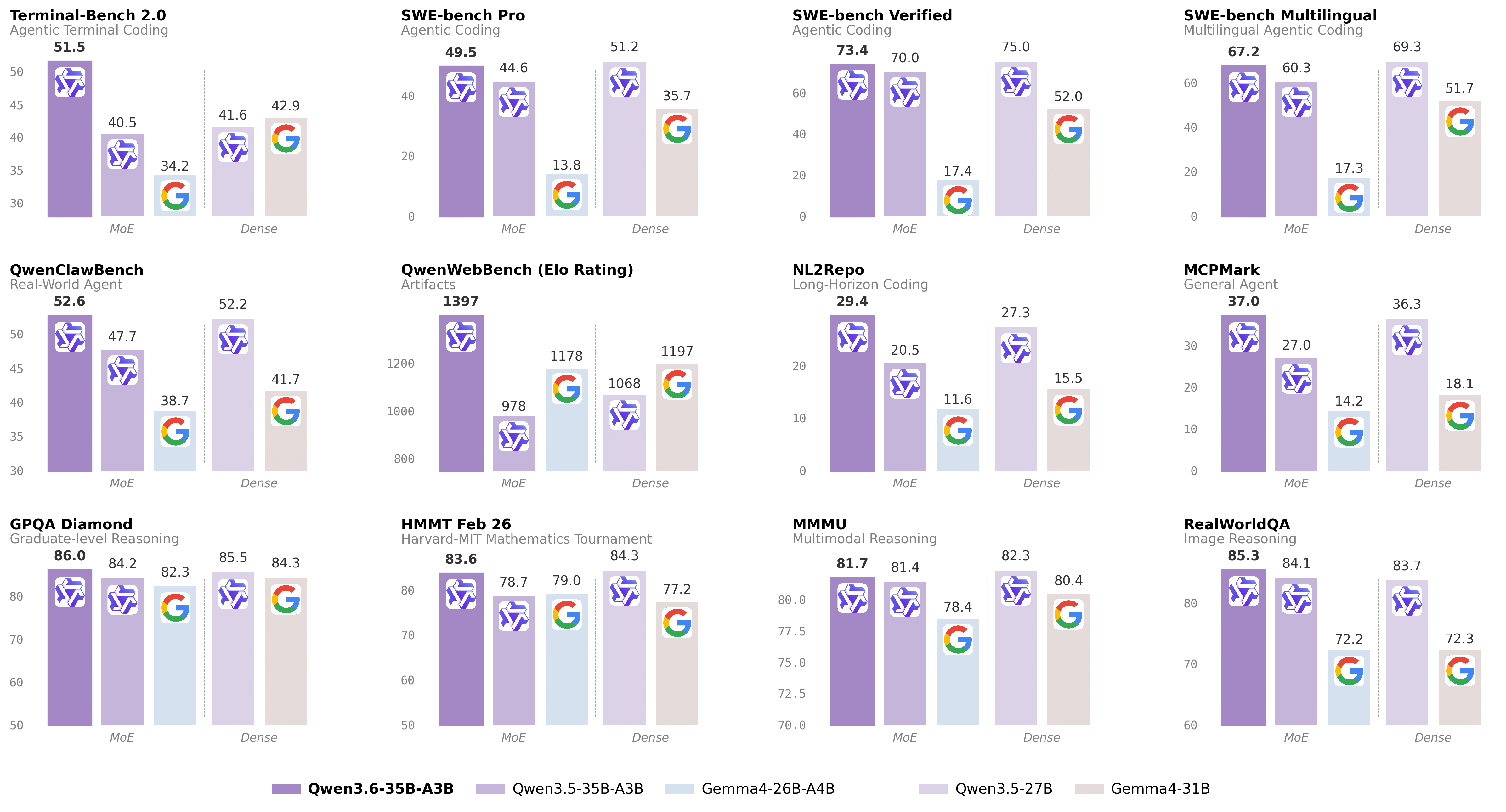
For more details, please refer to the Qwen blog post Qwen3.6-35B-A3B.
Base Model Overview
- Type: Causal Language Model with Vision Encoder
- Training Stage: Pre-training & Post-training
- Language Model:
- Number of Parameters: 35B in total and 3B activated
- Hidden Dimension: 2048
- Token Embedding: 248320 (Padded)
- Number of Layers: 40
- Hidden Layout: 10 x (3 x (Gated DeltaNet -> MoE) -> 1 x (Gated Attention -> MoE))
- Gated DeltaNet:
- Number of Linear Attention Heads: 32 for V and 16 for QK
- Head Dimension: 128
- Gated Attention:
- Number of Attention Heads: 16 for Q and 2 for KV
- Head Dimension: 256
- Rotary Position Embedding Dimension: 64
- Mixture Of Experts:
- Number of Experts: 256
- Number of Activated Experts: 8 Routed + 1 Shared
- Expert Intermediate Dimension: 512
- LM Output: 248320 (Padded)
- MTP: trained with multi-steps
- Context Length: 262,144 natively and extensible up to 1,010,000 tokens.
Base Benchmark Results
The following table is from the upstream Qwen3.6-35B-A3B release context and is included for base-model reference. It is not a benchmark of this fine-tuned checkpoint unless explicitly stated in the fine-tune benchmark table above.
| Category | Benchmark | Qwen3.5-27B | Gemma4-31B | Qwen3.5-35BA3B | Gemma4-26BA4B | Qwen3.6-35BA3B |
|---|---|---|---|---|---|---|
| Coding Agent | SWE-bench Verified | 75.0 | 52.0 | 70.0 | 17.4 | 73.4 |
| Coding Agent | SWE-bench Multilingual | 69.3 | 51.7 | 60.3 | 17.3 | 67.2 |
| Coding Agent | SWE-bench Pro | 51.2 | 35.7 | 44.6 | 13.8 | 49.5 |
| Coding Agent | Terminal-Bench 2.0 | 41.6 | 42.9 | 40.5 | 34.2 | 51.5 |
| Coding Agent | Claw-Eval Avg | 64.3 | 48.5 | 65.4 | 58.8 | 68.7 |
| Coding Agent | Claw-Eval Pass^3 | 46.2 | 25.0 | 51.0 | 28.0 | 50.0 |
| Coding Agent | SkillsBench Avg5 | 27.2 | 23.6 | 4.4 | 12.3 | 28.7 |
| Coding Agent | QwenClawBench | 52.2 | 41.7 | 47.7 | 38.7 | 52.6 |
| Coding Agent | NL2Repo | 27.3 | 15.5 | 20.5 | 11.6 | 29.4 |
| Coding Agent | QwenWebBench | 1068 | 1197 | 978 | 1178 | 1397 |
| General Agent | TAU3-Bench | 68.4 | 67.5 | 68.9 | 59.0 | 67.2 |
| General Agent | VITA-Bench | 41.8 | 43.0 | 29.1 | 36.9 | 35.6 |
| General Agent | DeepPlanning | 22.6 | 24.0 | 22.8 | 16.2 | 25.9 |
| General Agent | Tool Decathlon | 31.5 | 21.2 | 28.7 | 12.0 | 26.9 |
| General Agent | MCPMark | 36.3 | 18.1 | 27.0 | 14.2 | 37.0 |
| General Agent | MCP-Atlas | 68.4 | 57.2 | 62.4 | 50.0 | 62.8 |
| General Agent | WideSearch | 66.4 | 35.2 | 59.1 | 38.3 | 60.1 |
| Knowledge | MMLU-Pro | 86.1 | 85.2 | 85.3 | 82.6 | 85.2 |
| Knowledge | MMLU-Redux | 93.2 | 93.7 | 93.3 | 92.7 | 93.3 |
| Knowledge | SuperGPQA | 65.6 | 65.7 | 63.4 | 61.4 | 64.7 |
| Knowledge | C-Eval | 90.5 | 82.6 | 90.2 | 82.5 | 90.0 |
| STEM & Reasoning | GPQA | 85.5 | 84.3 | 84.2 | 82.3 | 86.0 |
| STEM & Reasoning | HLE | 24.3 | 19.5 | 22.4 | 8.7 | 21.4 |
| STEM & Reasoning | LiveCodeBench v6 | 80.7 | 80.0 | 74.6 | 77.1 | 80.4 |
| STEM & Reasoning | HMMT Feb 25 | 92.0 | 88.7 | 89.0 | 91.7 | 90.7 |
| STEM & Reasoning | HMMT Nov 25 | 89.8 | 87.5 | 89.2 | 87.5 | 89.1 |
| STEM & Reasoning | HMMT Feb 26 | 84.3 | 77.2 | 78.7 | 79.0 | 83.6 |
| STEM & Reasoning | IMOAnswerBench | 79.9 | 74.5 | 76.8 | 74.3 | 78.9 |
| STEM & Reasoning | AIME26 | 92.6 | 89.2 | 91.0 | 88.3 | 92.7 |
Notes from the upstream Qwen3.6 release:
- SWE-Bench Series: internal agent scaffold with bash and file-edit tools; temp=1.0, top_p=0.95, 200K context window.
- Terminal-Bench 2.0: Harbor/Terminus-2 harness; 3h timeout, 32 CPU/48 GB RAM; temp=1.0, top_p=0.95, top_k=20, max_tokens=80K, 256K ctx; average of 5 runs.
- SkillsBench: evaluated via OpenCode on 78 tasks, using a self-contained subset excluding API-dependent tasks; average of 5 runs.
- NL2Repo: evaluated via Claude Code for other models, with temp=1.0, top_p=0.95, max_turns=900.
- QwenClawBench: internal real-user-distribution Claw agent benchmark; temp=0.6, 256K ctx.
- QwenWebBench: internal front-end code generation benchmark; bilingual EN/CN, seven categories, auto-render plus multimodal judge, BT/Elo rating system.
- TAU3-Bench: official user model with gpt-5.2 low reasoning effort and default BM25 retrieval.
- VITA-Bench: average subdomain scores, using claude-4-sonnet as judge.
- MCPMark: GitHub MCP v0.30.3, Playwright responses truncated at 32K tokens.
- MCP-Atlas: public set score, gemini-2.5-pro judge.
- AIME 26: full AIME 2026 I and II.
Training Pipeline
Qwen/Qwen3.6-35B-A3B
-> supervised fine-tuning with LoRA
-> merged full model
-> Qwen3.6-35B-A3B-Claude-4.6-Opus-Reasoning-Distilled
Training configuration:
| Setting | Value |
|---|---|
| Fine-tuning method | Supervised fine-tuning with LoRA |
| LoRA target | Attention-only modules |
| LoRA rank / alpha | 32 / 32 |
| Micro-batch size | 1 |
| Gradient accumulation | 32 |
| Epochs | 2 |
| Completed steps | 762 / 762 |
| Final reported training loss | 0.3362497625740494 |
| Dataset max tokens | 8192 |
| Max sequence length | 32768 |
Training Data
The recipe samples and normalizes reasoning conversations from three datasets, then renders them with the qwen3-thinking chat template and response-only SFT masking.
| Dataset | Requested sample count | Role |
|---|---|---|
nohurry/Opus-4.6-Reasoning-3000x-filtered |
3,900 | Claude Opus reasoning trajectories |
Jackrong/Qwen3.5-reasoning-700x |
700 | Curated Qwen reasoning samples |
Roman1111111/claude-opus-4.6-10000x |
9,633 | Additional Claude Opus reasoning examples |
Intended Use
This model is intended for reasoning-heavy text workflows such as coding assistance, planning, math-style reasoning, and structured analytical responses. Because the fine-tune is text-only, image/video behavior should be treated as inherited from the base model rather than improved by this training run.
Acknowledgements
Thanks to the Qwen team for the base model, Unsloth for the training stack, and Jackrong for the public reasoning-distillation workflow that inspired this fine-tune.
- Downloads last month
- 1,979
2-bit
3-bit
4-bit
5-bit
6-bit
8-bit
16-bit
Model tree for mfielding92/UD-2.0-Qwen3.6-35B-A3B-Claude-4.6-Opus-Reasoning-Distilled-GGUF
Base model
Qwen/Qwen3.6-35B-A3BDatasets used to train mfielding92/UD-2.0-Qwen3.6-35B-A3B-Claude-4.6-Opus-Reasoning-Distilled-GGUF
nohurry/Opus-4.6-Reasoning-3000x-filtered
Roman1111111/claude-opus-4.6-10000x
Evaluation results
- exact_match, custom-extract, limited sample on MMLU-Protest set self-reported75.710
