

VocalRender: Score-Native Singing Voice Synthesis for Real-World Composition
Paper • 2607.27768 • Published • 2
VocalRender: Score-Native Singing Voice Synthesis for Real-World Composition
VocalRender is a score-native singing voice synthesis (SVS) model designed for real-world composition. It synthesizes 48 kHz singing directly from lyrics, MIDI pitches, symbolic note values, and tempo through an original combination of an interleaved lyric--note representation, continuous acoustic latents, and autoregressive diffusion modeling. It does not require phoneme-level durations, an explicit duration predictor, or a time-aligned acoustic reference.
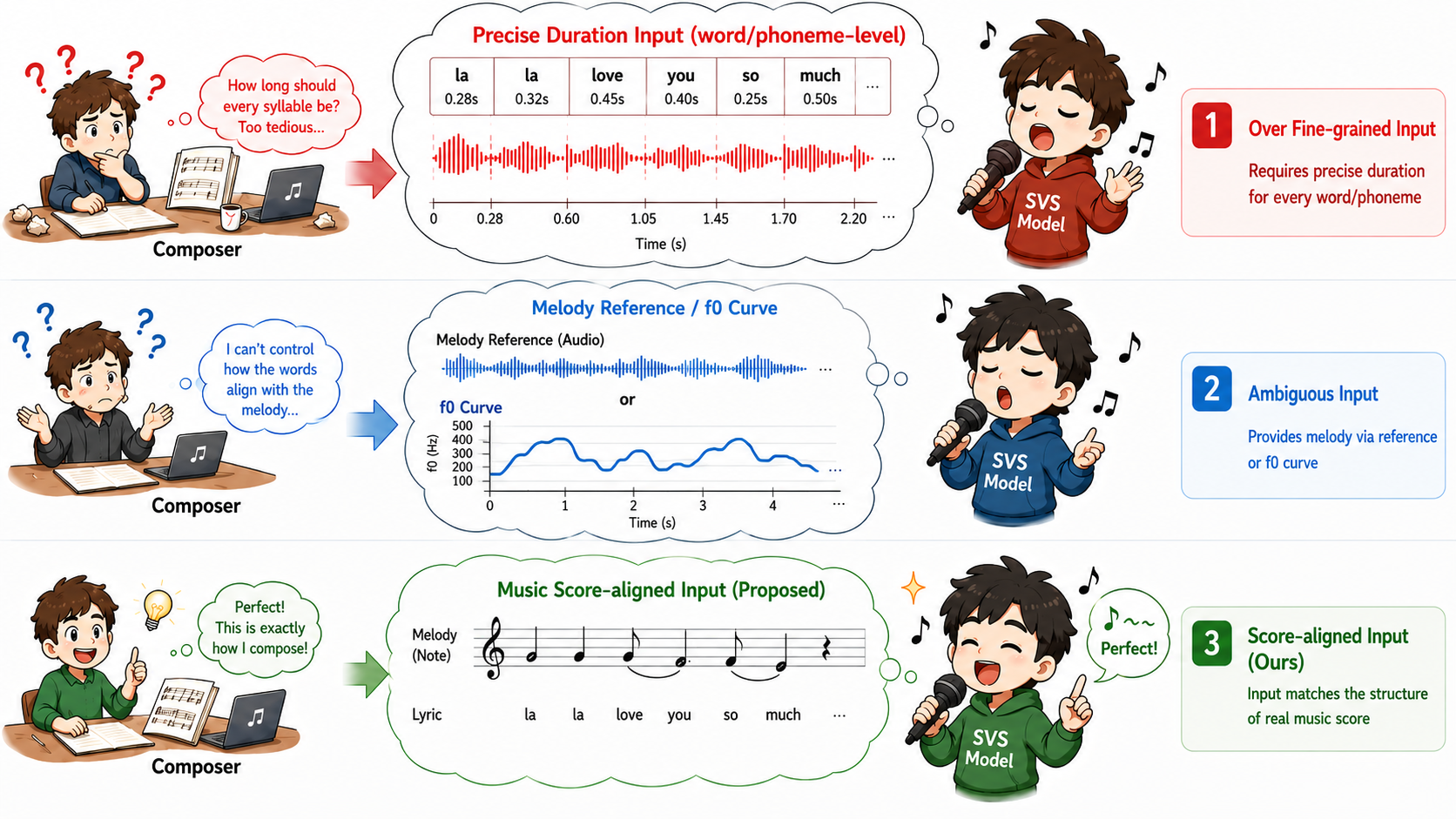
You do not need to understand machine learning or install the model to try VocalRender. Open the online VocalRender demo and work with familiar score formats in your browser.
VocalRender sings a melody that you provide. You choose the lyrics, notes, rhythm, tempo, and a short voice reference; the model renders them as a singing voice. It is a score renderer rather than an automatic composer: it does not write the melody or arrange an accompaniment for you.
w: or MusicXML lyrics can be imported. If
the score has no note-aligned lyrics, type or paste them in the lyrics box.In the editor, MIDI pitch 60 means middle C (C4), and pitch 0 means a
rest. + Melisma note lets one lyric syllable continue across multiple
notes. SP represents a rest or breath.
The released checkpoint currently works best with Mandarin Chinese and a
single vocal melody. Chord names in ABC, such as "C" or "G7", are treated
as accompaniment labels and ignored, but actual simultaneous notes are not
supported. For piano or ensemble scores, select a monophonic vocal/melody part.
The demo reports unsupported passages instead of silently guessing which note
should be sung.
VocalRender combines three components:
(pitch, note-value) pairs. This retains
lyric-to-note alignment and supports melisma.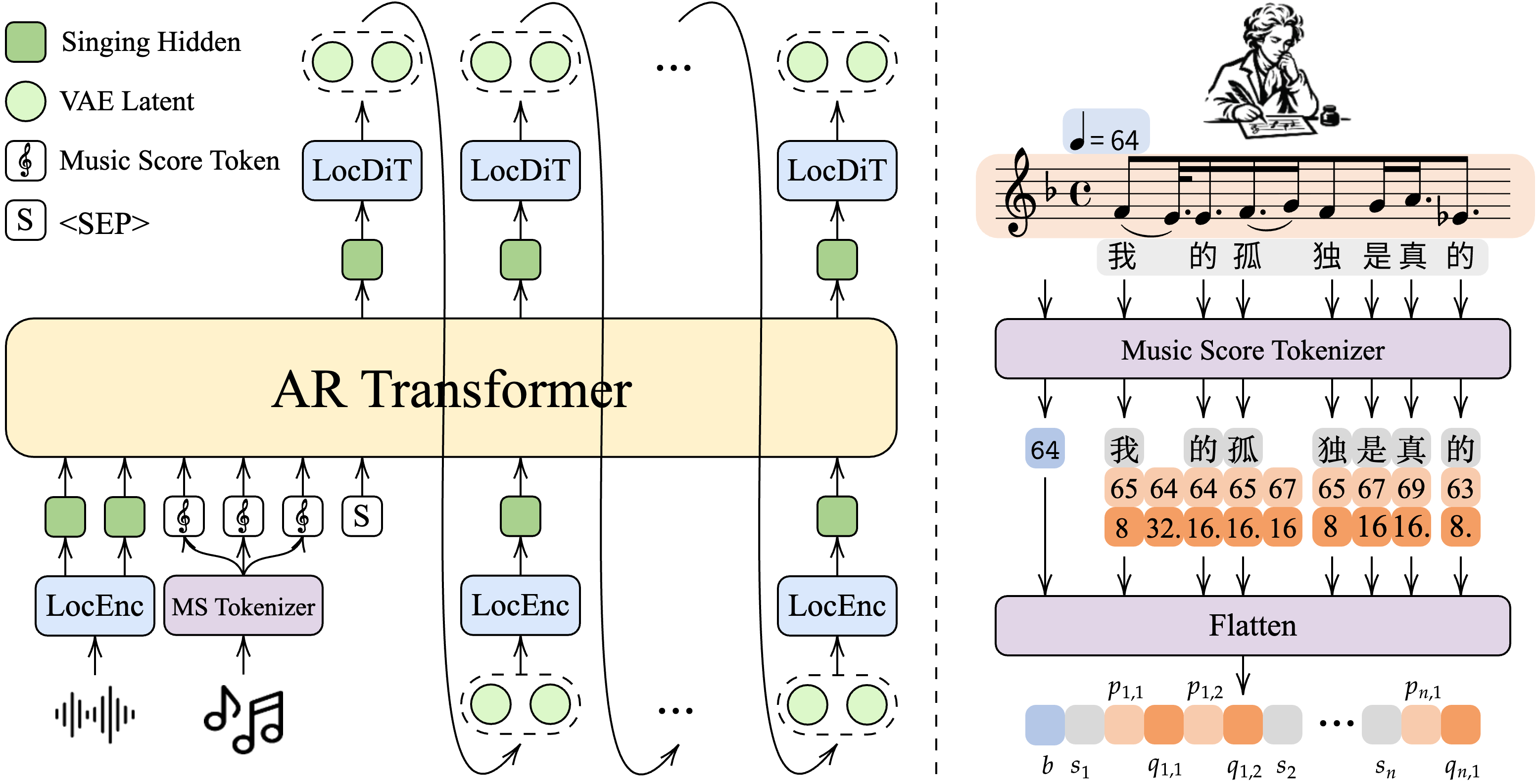
This repository contains two variants with the same architecture, parameter count, and speech-pretrained base-model initialization. Their only difference is the training recipe (training corpus and schedule):
| Variant | Repository path | Training data and strategy | Paper results |
|---|---|---|---|
| VocalRender | VocalRender/ |
CrawlSinger-OS (>2,300 h); 40k-step synthetic pretraining followed by 20k-step real-data finetuning | Stronger subjective score following (MS-MOS 2.96) |
| VocalRender-Pro | VocalRender-Pro/ |
CrawlSinger (>5,600 h of in-house real singing); 160k training steps | Better intelligibility, speaker similarity, naturalness, and OOD robustness; MS-MOS 2.71 |
VocalRender-Pro reduces WER from 4.44 to 3.88 and improves speaker similarity from 0.922 to 0.929 on Opencpop. On CrawlSinger-Eval, WER changes from 4.52 to 4.45 and similarity from 0.919 to 0.926. The paper relates these improvements to the larger amount of real singing and broader singer coverage. VocalRender's higher score-following score may reflect more reliable score annotations in its real-data finetuning subset.
Each directory contains the model weights, AudioVAE, model configuration, and extended SVS tokenizer required by the inference code. Both checkpoints have the same model size; each is approximately 9.5 GB to download.
git clone --recurse-submodules https://github.com/pymaster17/VocalRender.git
cd VocalRender
uv sync
source .venv/bin/activate
Download either checkpoint into the repository's pretrained_models/
directory:
# VocalRender
hf download pymaster/VocalRender \
    --include "VocalRender/*" \
    --local-dir pretrained_models

# Or VocalRender-Pro
hf download pymaster/VocalRender \
    --include "VocalRender-Pro/*" \
    --local-dir pretrained_models
The GitHub repository includes three ready-to-use prompt/score pairs selected from OpenCpop. This command runs the first demo:
python scripts/infer_vocalrender_svs_single.py \
    --ckpt_dir pretrained_models/VocalRender \
    --json_file examples/opencpop_demo.json \
    --item_name 2003000087 \
    --prompt_audio examples/prompt_audio/2003000081.wav \
    --output demo_2003000087.wav
Additional bundled pairs are 2017000646 with prompt 2017000644.wav, and
2044001652 with prompt 2044001666.wav. The prompt clips are 4.19-6.17
seconds long and do not overlap their paired target segment. Clone the
GitHub repository to obtain the
scripts and examples. The excerpts remain subject to the
OpenCpop terms.
Use pretrained_models/VocalRender-Pro as --ckpt_dir to run the Pro model.
Full generation requires a CUDA-capable compute node. Prompt audio is required:
the released checkpoints were trained with prompt audio on every sample
(prompt_audio_prob=1.0), so prompt-free inference is unsupported and may
substantially degrade quality. Use a clean 2-8 second singing clip, which also
provides the target timbre. See the
repository README for
batch-inference options.
{
  "item_name": "demo",
  "word": ["我", "的", "孤", "独"],
  "pitch": [65, 64, 64, 65, 67, 65],
  "note": ["<NOTE_8>", "<NOTE_32>", "<NOTE_16>", "<NOTE_16>", "<NOTE_16>", "<NOTE_8>"],
  "pitch2word": [0, 1, 2, 2, 2, 3],
  "bpm": 64
}
pitch2word[i] identifies the lyric index associated with note i, allowing
one lyric syllable to span multiple notes. word_dur and pitch_dur are
optional fields used only for visualization and evaluation; they are not model
inputs.
The released implementation initializes its ARDM backbone from the speech-pretrained VoxCPM2 weights. The score-native representation, SVS formulation, data pipeline, and singing training recipe are introduced by VocalRender.
@article{chen2026vocalrender,
  title   = {VocalRender: Score-Native Singing Voice Synthesis for Real-World Composition},
  author  = {Chen, Yukun and Wang, Tianrui and Mu, Zhaoxi and Yang, Xinyu and Chng, EngSiong},
  journal = {arXiv preprint arXiv:2607.27768},
  year    = {2026},
  url     = {https://arxiv.org/abs/2607.27768}
}
Apache License 2.0. See the repository's LICENSE file for details.
Base model
openbmb/VoxCPM2